
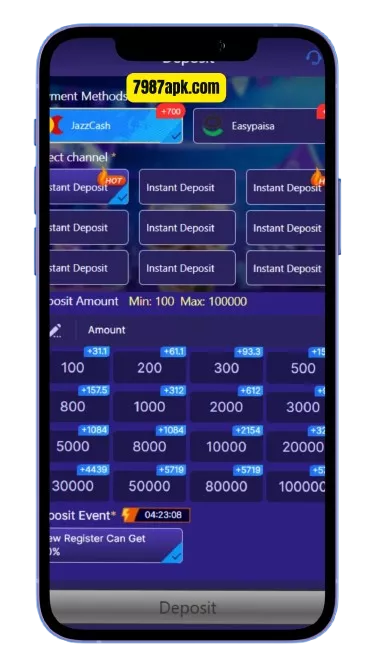
Depositing money into the 7987 Game app is how you fund your wallet for games — and 7987 supports the two wallets most Pakistanis already use: JazzCash and Easypaisa. This guide covers the exact deposit steps for both, how to confirm your payment, and what to do when a deposit does not show up. Need the app first? See our 7987 APK download guide.
⬇ Download 7987 APK & Deposit Easily
How Deposits Work on 7987
Deposits move money from your JazzCash or Easypaisa wallet into your 7987 in-app wallet. The app shows you a payment number for the transfer, you send the amount from your mobile wallet, and the balance is credited to your 7987 account. The whole process usually takes a few minutes when done correctly.
Before depositing, make sure your 7987 account is registered and verified — see our 7987 login and registration guide. Also check the current bonus offers, since first deposits may qualify for a promotional offer.
How to Deposit with JazzCash — Step by Step
- Open the 7987 app and log in.
- Tap the Wallet section, then select Deposit.
- Choose JazzCash as the deposit method.
- Enter the deposit amount within the limits shown on screen.
- Copy the payment number displayed by the app. This is the number you will send money to.
- Open your JazzCash app (or dial the JazzCash menu) and send the exact amount to that payment number.
- Save the transaction ID (TID) from the JazzCash confirmation message.
- Return to the 7987 app. If the app asks for the TID or sender number, enter them and submit.
- Check your 7987 wallet balance. The deposit should appear within a few minutes.
How to Deposit with Easypaisa — Step by Step
- Open the 7987 app, go to Wallet → Deposit.
- Choose Easypaisa as the method.
- Enter the amount within the displayed limits.
- Copy the payment number shown by the app.
- Open your Easypaisa app and transfer the exact amount to that number.
- Save the transaction ID from the Easypaisa confirmation.
- Return to 7987, enter the TID/sender number if asked, and submit.
- Confirm the new balance in your 7987 wallet.
Confirming the Payment Number
The payment number is the most important detail in the whole process. Always:
- Copy it fresh for every deposit. Payment numbers can change — never reuse a number from an old screenshot or a previous deposit.
- Match the amount exactly. Send precisely the amount you entered in the app, down to the rupee.
- Use the correct wallet. If you selected JazzCash in the app, send from JazzCash — not Easypaisa, and not a bank transfer.
- Keep the confirmation SMS until the balance appears in 7987.
Choosing Your First Deposit Amount
If this is your first deposit on 7987, start small — and that is not just caution for its own sake:
- Learn the process risk-free-ish. A small first deposit lets you practice the payment-number flow, the TID step, and the balance check without pressure.
- Confirm your wallet details work. A small deposit proves your JazzCash/Easypaisa account is linked correctly before larger amounts.
- Test a full cycle. Deposit small, play a little, then run a small withdrawal. Once the full loop works, you know the system is solid for your account.
- Stay within the minimum. Do not deposit below the app’s stated minimum — it will be rejected and you will have to chase support.
There is no prize for the biggest first deposit. The players who last are the ones who treat the first week as a learning period.
Deposit Not Credited? Fixes
Balance did not update after a few minutes
Wait a little longer first — network delays happen. Then check that you sent the exact amount to the exact payment number shown for that deposit. If everything matches and the balance still has not appeared, contact in-app support with your TID, amount, date, and time.
Sent to an old payment number
Payment numbers change between deposits. If you sent money to a number from a previous session, contact in-app support immediately with the TID and both numbers (the one you used and the current one). Recovery is not guaranteed.
Wrong amount sent
Sending even one rupee more or less than the entered amount can break automatic matching. Contact support with your TID and the exact amount sent.
Used the wrong wallet app
If you chose JazzCash in 7987 but sent from Easypaisa (or vice versa), the deposit may not match. Contact support with full details of what you did.
App closed during the deposit
Reopen the app and check your wallet — the deposit may have completed anyway. If not, and the app asks for the TID, enter it and resubmit.
Deposit Limits
7987 shows minimum and maximum deposit limits on the deposit screen, and these can change over time. Always go by the figures displayed in the app at the moment of your deposit. Starting with a smaller first deposit is sensible while you learn the process.
Deposit Safety Tips
- Only deposit inside the official app. Never send money to a “deposit number” given by someone on WhatsApp, Telegram, or Facebook.
- Never share your OTP, password, or wallet PIN with anyone — support never asks for these.
- Deposit only what you can afford. Set a personal spending limit before you start and stick to it.
- Keep records. Save every TID and confirmation SMS until the deposit is credited and you have played or withdrawn.
- Ignore “double your deposit” schemes. Anyone promising to multiply your deposit outside the app is running a scam.
Once your wallet is funded, explore the games — slots, Teen Patti, and Aviator-style games. When you are ready to cash out, follow our withdrawal guide.
⬇ Get the 7987 APK — Free for Android
Depositing in 7987 — FAQs
Which wallets can I use to deposit in 7987?
JazzCash and Easypaisa — the two methods supported in the app’s deposit section.
How long does a 7987 deposit take?
Usually a few minutes when the amount and payment number match exactly. Delays happen occasionally — wait a bit, then check with support if the balance still has not appeared.
What is the minimum deposit on 7987?
The app displays its current minimum and maximum on the deposit screen. Limits can change, so always check the live figures inside the app.
Can I get the payment number in advance?
No — and you should not try. Always copy the payment number fresh inside the app for each deposit, because numbers change.
My deposit is not showing. What should I do?
Confirm you sent the exact amount to the exact number shown for that deposit. If both are correct, contact in-app support with your transaction ID, amount, date, and time.
Is there a fee on deposits?
Any applicable fee is shown on the deposit screen before you confirm. Read it each time, since fee policies can change.
Can I deposit with a bank transfer or card?
The app’s deposit section lists the supported methods — currently JazzCash and Easypaisa. Only use a method the app itself offers.
How many deposits can I make per day?
The app may set daily deposit counts or totals alongside the per-transaction limits. Check the deposit screen for the current rules — they are displayed before you confirm.
Will I get a bonus on every deposit?
No. Promotional deposit offers apply to specific deposits (like the first deposit) or during specific campaigns. Regular deposits outside an active offer do not earn bonuses — check the rewards section to see what is currently active.
1 thought on “How to Deposit Money in 7987 (JazzCash & Easypaisa)”