
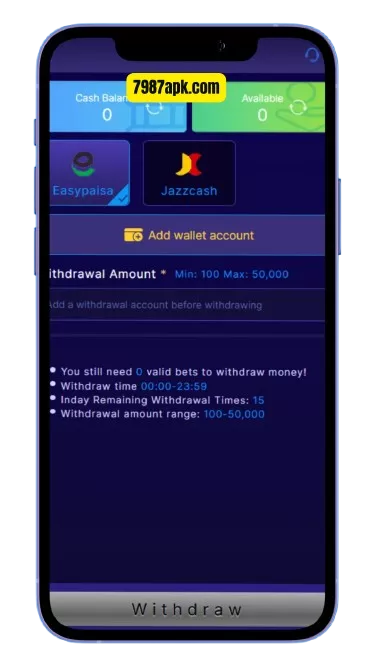
Withdrawing your winnings from the 7987 Game app to JazzCash or Easypaisa is a straightforward process once your account is set up. This guide walks you through every step — the prerequisites, the exact withdrawal flow for both wallets, how long it takes, and fixes for the most common withdrawal problems. If you have not installed the app yet, start with our 7987 APK download guide.
⬇ Download 7987 APK & Withdraw Winnings
Before You Withdraw: Prerequisites
Check these four things before requesting a withdrawal — most failed withdrawals happen because one of them is missing:
- A registered, verified account. Your 7987 account must be registered with your mobile number and OTP-verified. See our 7987 login and registration guide if you have not done this.
- Withdrawable balance. Your wallet must hold enough balance. Note that promotional bonus funds may carry play-through requirements before they become withdrawable — check the conditions on the 7987 bonuses page.
- An active JazzCash or Easypaisa account. The wallet must be registered and able to receive transfers.
- Matching details. The name/number on the receiving wallet should match your 7987 account details. Mismatches are the number-one cause of failed withdrawals.
How to Withdraw Money from 7987 to JazzCash
- Open the 7987 app and log in.
- Tap the Wallet section on the main screen.
- Select Withdraw.
- Choose JazzCash as the withdrawal method.
- Enter the amount you want to withdraw. Respect the minimum and maximum limits shown on the screen.
- Enter your JazzCash account details — the mobile number linked to your JazzCash account and the account holder name, exactly as registered.
- Double-check every digit before confirming. A wrong number sends your money to the wrong wallet.
- Confirm the request and complete any verification step the app asks for.
- Save the transaction reference shown on the confirmation screen until the money arrives.
How to Withdraw Money from 7987 to Easypaisa
The Easypaisa flow is identical, only the destination changes:
- Open the Wallet and tap Withdraw.
- Choose Easypaisa as the method.
- Enter the amount within the displayed limits.
- Enter your Easypaisa account number and holder name exactly as registered with Easypaisa.
- Verify every digit, confirm, and complete verification.
- Save the transaction reference until the funds arrive.
New to funding your account in the first place? Read how to deposit money in 7987.
Withdrawal Limits and Processing Time
The app displays its current minimum and maximum withdrawal limits on the withdrawal screen — these can change, so always go by what the app shows at the time of your request. Processing time also varies: many withdrawals complete within a few hours, while some take longer during busy periods or when additional verification is needed. If your withdrawal shows as “pending,” give it time before assuming something is wrong — but keep your transaction reference safe.
How to Track Your Withdrawal Status
After submitting a withdrawal, you can follow its progress:
- Open the Wallet section in the 7987 app.
- Look for Transaction History or a similar option.
- Find your withdrawal entry. It will show a status such as pending, processing, completed, or failed.
- Note the transaction reference — you will need it if you contact support.
- Check your JazzCash/Easypaisa history as well. Incoming transfers sometimes arrive without an SMS notification, so the money may already be there.
Only contact support after the stated processing window has passed and both histories show nothing. Having your reference number ready makes support much faster.
Common Withdrawal Problems and Fixes
Withdrawal failed — details mismatch
This is the most common failure. The wallet number or holder name you entered does not match the registered records. Cancel the failed request, re-enter the details character by character, and submit again.
Withdrawal stuck on “pending”
Pending usually means the request is in the processing queue. Wait for the stated processing window first. If it stays pending far beyond that, contact in-app support with your transaction reference ready.
Amount below minimum or above maximum
The app rejects amounts outside its current limits. Adjust your amount to fit within the minimum and maximum shown on the withdrawal screen.
Bonus balance cannot be withdrawn
Promotional bonus funds often carry play-through requirements. Check the bonus conditions in the app’s rewards section — once the requirements are met, the funds become withdrawable.
Money deducted but not received
First, check your JazzCash/Easypaisa transaction history — transfers sometimes arrive without an SMS alert. If nothing arrived after the processing window, contact 7987 in-app support with your transaction reference, the exact amount, date, and time.
Wrong wallet number entered
If you submitted a withdrawal to the wrong number, contact in-app support immediately with your transaction reference. Recovery is not guaranteed, which is why double-checking digits before confirming matters so much.
Withdrawal Safety Tips
- Never share your OTP or password with anyone offering to “speed up” your withdrawal. Real withdrawals happen only inside the app.
- Withdraw to your own wallet only. Using someone else’s JazzCash/Easypaisa account causes verification failures.
- Keep transaction references until every withdrawal is complete and the money is in your wallet.
- Beware of fake support accounts on WhatsApp or Telegram asking for payment to “release” withdrawals. The official process is free and in-app.
- Start with a smaller test withdrawal if it is your first time, to confirm your details are correct.
⬇ Get the 7987 APK — Free for Android
Withdrawing from 7987 — FAQs
How long does a 7987 withdrawal take?
It varies. Many complete within a few hours; some take longer during busy periods or when verification is needed. The app’s withdrawal screen shows the current expectations — always go by that.
What is the minimum withdrawal on 7987?
The app sets minimum and maximum limits that can change over time. Check the withdrawal screen inside the app for the current figures before requesting.
Can I withdraw to someone else’s JazzCash account?
It is not recommended. Withdrawals work most reliably when the wallet belongs to you and the details match your 7987 account.
Why is my withdrawal pending for so long?
Pending means the request is queued for processing. Wait out the stated window first; if it drags far beyond that, contact in-app support with your transaction reference.
Can I cancel a withdrawal request?
It depends on its status. If it is still pending and the app offers a cancel option, use it. Once processed, it cannot be reversed — contact support immediately if you entered wrong details.
Do I pay a fee on withdrawals?
Fee policies can change. The withdrawal screen shows any applicable fee before you confirm — read it carefully each time.
Can I withdraw at any time of day?
The withdrawal option is available in the app around the clock, but processing may be slower late at night or on public holidays when fewer staff are on duty. If timing matters, submit earlier in the day.
What happens if I change my mobile number?
Your 7987 account is tied to your registered number, which is also your recovery method. If you change SIMs, update your account details inside the app while you still have access to the old number — otherwise withdrawals and recovery become difficult.
Is it safe to withdraw from 7987?
Withdrawals through the official app to your own verified JazzCash or Easypaisa wallet follow the standard process. Keep your OTP private, double-check details, and never trust third parties offering to handle withdrawals for you. For a broader trust overview, read is 7987 real or fake.
1 thought on “How to Withdraw Money from 7987 to JazzCash & Easypaisa”